


🎥 How to Get the Best VR Output from Your Videos
- Creators at Gretxp

- Mar 28
- 2 min read
👀 It all comes down to one thing: how your video is shot
The most important thing to understand is this: VR works best when your video already feels like a place, not a close-up moment.

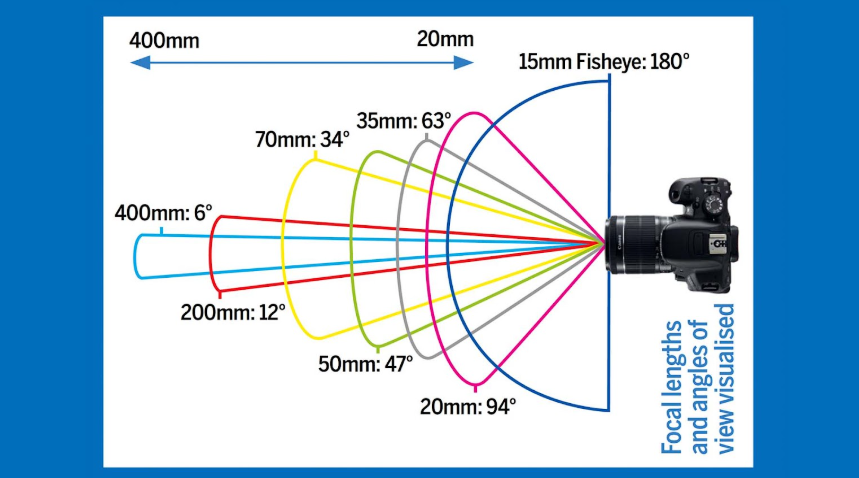
Wide, open scenes where you can imagine standing and looking around will always convert better than tight, zoomed-in clips. If your video captures space, depth, and surroundings, the VR output will feel natural. If it captures just a subject, it will feel stretched and limited.
🎬 What works (and what doesn’t)

Videos that work well are usually wide-angle, stable, and environment-focused like landscapes, city views, or large indoor spaces. On the other hand, close-up faces, text-heavy videos, or tightly framed shots don’t translate well into VR because there’s nothing beyond the center to explore. A simple rule: if your video feels “zoomed in” on your phone, it will feel even more restrictive inside a headset.
🤖 Using AI tools like Veo or other generators
AI video tools can actually give better VR results than real footage, if prompted correctly. A simple prompt that works well is:
“Create a 360 degree equirectangular video for ……”
Good examples include nature scenes, city skylines, sci-fi environments, or large architectural spaces. Avoid prompts that mention "close-up", “portrait,” or “person speaking,” as these reduce immersion, best for pov shorts,explain the lighting the camera moment, and camera directions
You can also turn image to video using AI Tools like VEO for more expected results for continuous scenes

The rule is simple and worth repeating: the more your video feels like a space, the better it works in VR.
Think less about “converting a video” and more about capturing or generating an environment you can step into. If users follow this one principle, the output quality improves dramatically without any change in technology.


Comments